
Todayee Text for Evernote1.1.1 - App Store
You'll be able to see results in few seconds.
Publisher Description
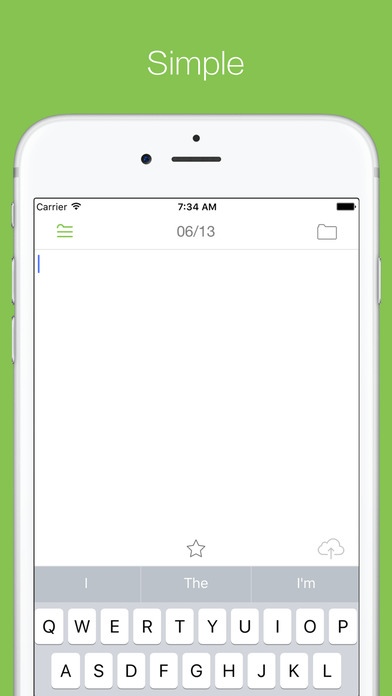
Todayee is the type of Evernote for post-only app that does not exist up to now. According to the application, such as text and photos There are various Todayee app. All those apps posts will be summarized in the notes of the day. Also posts from other iPhone / iPad can be aggregated to the note of the same day.
[ Todayee Text features ]
- It is simple app that specializes in posting of text
- You can input text from immediately after the start-up
[ Todayee apps common features ]
- Offers a variety of apps to suit your purpose
- Today to aggregate all of the post of the day in one note
- Record the time, place, weather, temperature
- Posts are sorted in order of time in the day notes
- You can change the switching reference time (usually 0:00)
- Notebook and set of tags can
- Notes of the title can be selected from a prepared date format
- Name and you can distinguish between the post and to register the name of the device
- Posts are done in the background
- You can be the highlight of the post put a star
[ Notes ]
- To merge posts to one note from multiple apps and multiple devices, you must use same Evernote account.
- If you want to post beyond the capacity of per note of Evernote, notes of the same date will create a new (attaches to the end title # 2 # 3 ... and). Later, it will be summarized in a new note, regardless of the day of post time.
- Title of the format will be reflected from the next day of the post. Please be if you want to change to immediately open the setting screen to run the "switches the postscript destination to the new notes."
[ For transmission failure ]
If you want to post offline, if the network there is a problem, you may not be posted. In this case, it appears to have buried the contents of the upper-right corner of the folder icon. Also unsent number in the app icon will be displayed in the badge. In the case of a temporary problem of network and Evernote, in most cases in the automatic transmission of the next start it will be eliminated unsent. If you can not post, please delete the post of problems with the following procedure.
1. Start the app
2. Tap the top right corner of the folder icon
3. Wait for a while until the error comes out
4. If you get an error and then tap the post
5. Error message will be displayed
6. Tap the Resume" in the bottom of the screen
7. Send to yourself When the mailer is risen.
8. Return to the previous screen
9. Remove the line and was out of the error
(Flick to select the Delete)
[ FAQ ]
Q. place name was not published
A. When a network problem, the place name will not be published.
Q. weather and temperature will not be published
A. interval of information acquisition will be 10 minutes at least. Weather and temperature and not older than 10 minutes after the last post will not be published. If a post or a network of off-line there is a problem information will not be published in order to not be acquired.
Q. It will be posted as "fine" Yet "Rain"
A. The weather information service of the specification you are using, you may not agree with the local situation.
Q. App / device common settings can not be well
A. Sorry >_The Evernote has become difficult to understand a little in order to be synchronized to devise a place originally there is no such function. Please look at the situation over a period of some time.
Q. Not normal behavior in multiple time zones
A. Unfortunately, it does not support multiple time zones.
Q. Not normal behavior in multiple languages
A. Unfortunately, it does not support multiple languages.
[ Support ]
Questions or requests, please send to the following address.
support@lakesoft.jp
Requires iOS 9.3 or later. Compatible with iPhone, iPad, and iPod touch.
About Todayee Text for Evernote
The company that develops Todayee Text for Evernote is Hiroshi Hashiguchi. The latest version released by its developer is 1.1.1.
To install Todayee Text for Evernote on your iOS device, just click the green Continue To App button above to start the installation process. The app is listed on our website since 2016-06-18 and was downloaded 0 times. We have already checked if the download link is safe, however for your own protection we recommend that you scan the downloaded app with your antivirus. Your antivirus may detect the Todayee Text for Evernote as malware if the download link is broken.
How to install Todayee Text for Evernote on your iOS device:
- Click on the Continue To App button on our website. This will redirect you to the App Store.
- Once the Todayee Text for Evernote is shown in the iTunes listing of your iOS device, you can start its download and installation. Tap on the GET button to the right of the app to start downloading it.
- If you are not logged-in the iOS appstore app, you'll be prompted for your your Apple ID and/or password.
- After Todayee Text for Evernote is downloaded, you'll see an INSTALL button to the right. Tap on it to start the actual installation of the iOS app.
- Once installation is finished you can tap on the OPEN button to start it. Its icon will also be added to your device home screen.
Program Details
System requirements
Download information
Pricing
Version History
version 1.1.1
posted on 2016-06-18
Disclaimer
Official App Store Link
We do not host Todayee Text for Evernote on our servers. We did not scan it for viruses, adware, spyware or other type of malware. This app is hosted by Apple and passed their terms and conditions to be listed there. We recommend caution when installing it.
The App Store link for Todayee Text for Evernote is provided to you by apps112.com without any warranties, representations or guarantees of any kind, so access it at your own risk.
If you have questions regarding this particular app contact the publisher directly. For questions about the functionalities of apps112.com contact us.
